Ever finished a print and thought, "that looks nothing like the picture I had in my head"? Your CAD preview is a perfect, smooth shape, but your printer builds in layers. A new tool called Extrudio tries to close that gap by showing you what the print will really look like.
Rendering from instructions, not shapes
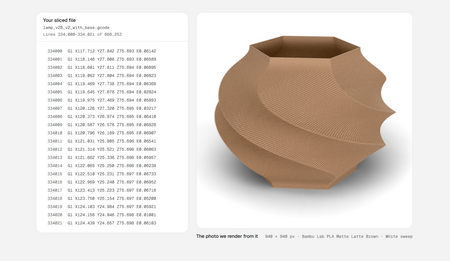
Most CAD programs make pretty images from the model's geometry, usually an STL file. Extrudio takes a different route. It reads the G-code, the list of moves your printer follows, and sweeps a virtual bead of plastic along each path. The result is a render that shows layer lines and the stair-stepping you see on curves and spheres, just like the real thing.
Why that is useful
Because it works from the same instructions your printer uses, the picture is closer to the truth than a normal render. You can drop the model into a studio backdrop or a scene such as a bench or kitchen, which is handy for product photos if you sell prints. It is not a replacement for a real print, since actual filament, light and color will always win, but it is a fast way to try ideas.
How to preview your own prints
You can borrow the idea today with tools you already have. Slice your model, then scrub through the layer view to catch gaps and rough overhangs. Check how the first layer lays down, since that sets the tone for everything above it. If color or finish matters, print a tiny test piece in the same filament before committing to a long job. A few minutes of checking can save hours and a lot of wasted material.
Try it on your printer
Want something worth previewing? Browse printable models, guides and maker-tested ideas at Flarelab, pick a model with some curves, and see how its layer lines look in your slicer before you print.
Frequently asked questions
What is G-code?
G-code is the text file your slicer produces. It tells your printer exactly where to move, how fast, and how much filament to push out, one tiny step at a time.
Why render from G-code instead of an STL file?
An STL only describes the ideal shape. G-code describes the actual toolpaths, so a render built from it can show layer lines, stair-stepping on curves and other real printing effects.
Can a render replace a real test print?
No. A render is a quick way to judge look and finish, but a real print still tells you the truth about strength, fit and color. Use renders to cut down on wasted filament, not to skip testing.
How can I preview a print without special software?
Open your slicer's layer view and scrub through it, check the first layer closely, and print a small test piece of the same filament before committing to a long print.
Inspired by reporting from Hackaday. Rewritten by Flarelab for beginners.