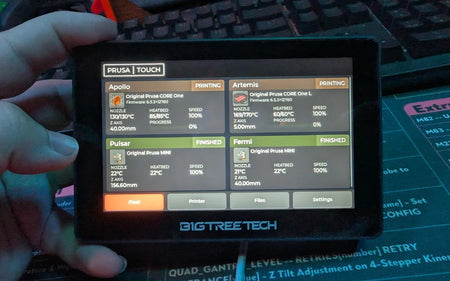
Ever wished you could glance at one little screen and instantly see how every 3D printer in your workshop is doing? A new open-source firmware project makes exactly that possible, turning an inexpensive touchscreen into a live dashboard for a whole fleet of Prusa printers.
Most modern Prusa machines, from a lovingly upgraded MK3 to the newer CORE One, can hop onto your home network. Once connected, they report their status to Prusa's smartphone app and web interface so you can keep an eye on all that hot plastic from anywhere. It is a handy feature, but flipping open an app every few minutes gets old fast when you are running several machines at once, and glancing across a room at a wall-mounted screen is simply faster than digging your phone out of a pocket.
That is where this project shines. Developed by a maker known as Nomads Galaxy, the custom firmware runs on the BigTreeTech K-Touch and Panda Touch displays, gadgets that were originally built to control Klipper printers. Reflashed with the new code, they speak directly to Prusa printers over your local network or through the Prusa Connect cloud, and the interface deliberately mimics the look of Prusa's official tools so it feels familiar from the first tap. That means you can watch print progress, check temperatures, and spot a failed job at a glance without touching your computer or phone.
Getting started is refreshingly approachable. Both supported screens use the popular ESP32 chip, and the developer provides ready-to-flash binary images you can install through several methods. Pick your display, download the matching image, flash it much like you would update any small gadget, and point it at your printers on the same network. As a bonus, the firmware still handles Klipper machines and even cloud-connected Bambu Lab units, so a mixed workshop can run everything from one panel.
Want to try it on your printer? If you have a spare BigTreeTech touchscreen sitting in a drawer, this is a fun weekend upgrade that gives your workspace a professional command-center feel. For more beginner-friendly 3D printing projects, tips, and filament to keep those machines humming, visit Flarelab.
Frequently asked questions
Do I need to be online to monitor my Prusa printer?
No. Prusa printers run perfectly offline, but connecting them to your network unlocks remote monitoring through the Prusa app, the web interface, or a dedicated touchscreen like this one.
What hardware does this custom firmware run on?
It runs on the BigTreeTech K-Touch and Panda Touch screens. Both are built around the ESP32 chip, which is why the same little display can also be repurposed for other hobby projects.
Can one screen control more than one brand of printer?
Yes. Besides Prusa, the firmware still talks to Klipper machines and cloud-connected Bambu Lab units, so a mixed workshop can share a single dashboard, though Bambu setup is a little more involved.
Is the project free to use?
It is fully open source with ready-to-flash images available, so you can try it without buying anything beyond the touchscreen itself.
Inspired by reporting from Hackaday. Rewritten and expanded by Flarelab.