Ever finished a print and thought, "That does not look like my 3D model"? You are not imagining it. The shiny render in your design software and the real part on your print bed are two different things.
Normal CAD renders show the geometry you drew: smooth curves, perfect surfaces, no seams. But a 3D printer never sees that perfect shape. Your slicer chops it into thin layers and turns each one into G-code, a long list of movement instructions telling the nozzle where to go and how much plastic to push out.
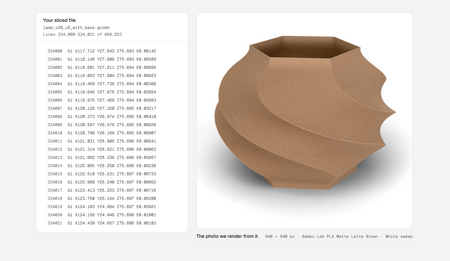
A new tool called Extrudio takes a different approach. Instead of rendering your model file, it reads the G-code and sweeps a virtual bead of plastic along the same toolpaths your printer would follow. The result shows layer lines, stair-stepping on spheres and curves, and other quirks of real printing. You can even place the render on a bench or in a kitchen scene, which is handy if you want product pictures before the part is printed.
How to use the idea: slice your model as you normally would, then look at the slicer's layer preview and scrub through the layers. Notice where curves turn into steps, where seams line up, and where the surface looks rough. If something looks off, try a smaller layer height or a different seam position, then slice again. A realistic G-code render takes that same habit one step further.
Try it on your printer: pick any small model, such as a vase or a phone stand, and slice it twice, once at 0.28 mm and once at 0.12 mm layers. Compare the previews, then print your favorite. Need ideas for what to print next? Browse the models and gear at flarelab.com.
Frequently asked questions
What is G-code?
G-code is the list of step-by-step movement instructions your slicer creates and your 3D printer follows, telling it where to move, how fast, and how much plastic to push out.
How is a G-code render different from a normal CAD render?
A CAD render shows the ideal shape you designed. A G-code render follows the printer's actual toolpaths, so it can show layer lines, stair-stepping on curves, and other effects of the printing process.
Do I need a G-code preview to start 3D printing?
No. Your slicer already includes a basic layer preview, which is plenty when you are starting out. A realistic render is a nice extra for product photos or sharing designs.
Can a render replace a real photo of my print?
Not completely. A render is great for quick mock-ups and testing colors, but a photo of the real part is still more convincing to buyers.
Inspired by reporting from Hackaday. Rewritten by Flarelab for beginners.